Contents
see List결제/간편결제 모듈 연동 (이니시스, 카카오페이, 네이버페이)
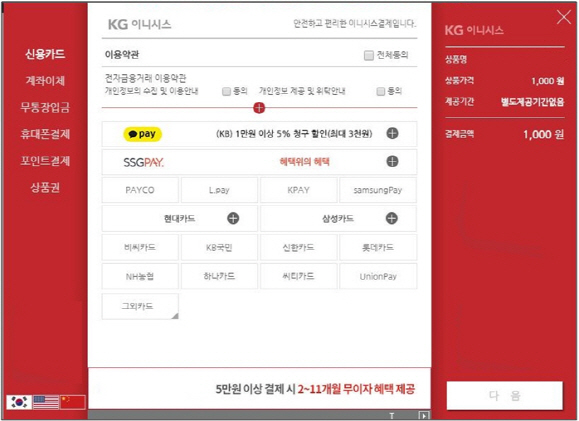
전자결제 서비스를 웹사이트에 연동하는 방법입니다. 이니시스(KG이니시스), 카카오페이, 네이버페이 등 주요 결제 모듈의 연동 흐름과 핵심 코드를 설명합니다.
언제 사용하나요?
- 쇼핑몰 결제 시스템 구축
- 정기 구독 결제
- 모바일 간편결제 지원
- 다양한 결제 수단 제공
결제 연동 기본 흐름
1. 주문 정보 생성 (서버)
2. 결제창 호출 (클라이언트)
3. 결제 완료 (PG사 처리)
4. 결제 결과 수신 (서버 콜백)
5. 주문 완료 처리 (서버)
KG이니시스 연동
<!-- 이니시스 JS 로드 -->
<script src="https://stdpay.inicis.com/stdjs/INIStdPay.js"></script>

<!-- 결제 폼 -->
<form id="payForm" method="post">
    <input type="hidden" name="gopaymethod" value="Card">
    <input type="hidden" name="mid" value="가맹점ID">
    <input type="hidden" name="oid" value="주문번호">
    <input type="hidden" name="price" value="10000">
    <input type="hidden" name="goodname" value="상품명">
    <input type="hidden" name="buyername" value="구매자명">
    <input type="hidden" name="buyertel" value="01012345678">
    <input type="hidden" name="buyeremail" value="[email protected]">
    <input type="hidden" name="returnUrl" value="결제완료URL">
    <input type="hidden" name="signature" value="서명값">
    <input type="hidden" name="timestamp" value="타임스탬프">
</form>

<script>
function doPay() {
    INIStdPay.pay("payForm");
}
</script>
카카오페이 연동
// 서버: 결제 준비 API 호출
@PostMapping("/kakaopay/ready")
public ResponseEntity<?> kakaoPayReady(@RequestBody OrderDto order) {
    HttpHeaders headers = new HttpHeaders();
    headers.set("Authorization", "SECRET_KEY " + secretKey);
    headers.set("Content-Type", "application/json");

    Map<String, String> params = new HashMap<>();
    params.put("cid", "TC0ONETIME");           // 가맹점 코드
    params.put("partner_order_id", order.getOrderId());
    params.put("partner_user_id", order.getUserId());
    params.put("item_name", order.getItemName());
    params.put("quantity", "1");
    params.put("total_amount", order.getAmount());
    params.put("tax_free_amount", "0");
    params.put("approval_url", "승인URL");
    params.put("cancel_url", "취소URL");
    params.put("fail_url", "실패URL");

    // API 호출
    ResponseEntity<KakaoPayReady> response = restTemplate.postForEntity(
        "https://open-api.kakaopay.com/online/v1/payment/ready",
        new HttpEntity<>(params, headers),
        KakaoPayReady.class
    );

    // tid 저장 (승인 시 필요)
    session.setAttribute("tid", response.getBody().getTid());

    return ResponseEntity.ok(response.getBody());
}

// 승인 처리
@GetMapping("/kakaopay/approve")
public ResponseEntity<?> kakaoPayApprove(@RequestParam String pg_token) {
    Map<String, String> params = new HashMap<>();
    params.put("cid", "TC0ONETIME");
    params.put("tid", session.getAttribute("tid"));
    params.put("partner_order_id", orderId);
    params.put("partner_user_id", userId);
    params.put("pg_token", pg_token);

    // 승인 API 호출
    ResponseEntity<KakaoPayApprove> response = restTemplate.postForEntity(
        "https://open-api.kakaopay.com/online/v1/payment/approve",
        new HttpEntity<>(params, headers),
        KakaoPayApprove.class
    );

    // 주문 완료 처리
    orderService.completeOrder(orderId);

    return ResponseEntity.ok(response.getBody());
}
네이버페이 연동
// 네이버페이 SDK 초기화
<script src="https://pay.naver.com/sdk/js/naverpay.min.js"></script>

<script>
var oPay = Naver.Pay.create({
    mode: "production",  // development / production
    clientId: "네이버페이_클라이언트ID",
    chainId: "체인ID"
});

function naverPay() {
    oPay.open({
        merchantPayKey: "주문번호",
        productName: "상품명",
        productCount: 1,
        totalPayAmount: 10000,
        taxScopeAmount: 10000,
        taxExScopeAmount: 0,
        returnUrl: "결제완료URL"
    });
}
</script>

// 서버: 결제 승인
@PostMapping("/naverpay/approve")
public ResponseEntity<?> naverPayApprove(
        @RequestParam String paymentId,
        @RequestParam String resultCode) {

    if ("Success".equals(resultCode)) {
        // 네이버페이 승인 API 호출
        HttpHeaders headers = new HttpHeaders();
        headers.set("X-Naver-Client-Id", clientId);
        headers.set("X-Naver-Client-Secret", clientSecret);

        Map<String, String> params = new HashMap<>();
        params.put("paymentId", paymentId);

        // 승인 처리...
    }

    return ResponseEntity.ok().build();
}
결제 취소 처리
// 이니시스 취소
public void cancelInicis(String tid, int cancelAmount) {
    // 취소 API 호출
}

// 카카오페이 취소
public void cancelKakaoPay(String tid, int cancelAmount) {
    Map<String, Object> params = new HashMap<>();
    params.put("cid", "TC0ONETIME");
    params.put("tid", tid);
    params.put("cancel_amount", cancelAmount);
    params.put("cancel_tax_free_amount", 0);

    restTemplate.postForEntity(
        "https://open-api.kakaopay.com/online/v1/payment/cancel",
        new HttpEntity<>(params, headers),
        Map.class
    );
}
보안 주의사항
- 결제 금액 위변조 검증 필수
- API 키는 서버에서만 사용
- SSL/HTTPS 필수
- 결제 결과는 서버에서 PG사 API로 재검증
- 로그 기록 및 모니터링
port
| No | Title |
|---|---|
| 3024 | AngularJS 기반 ThePEM 자동화 개발 및 보안시스템 구축 |
| 3023 | 후레쉬워터 S-CARE 시스템 신규개발 |
| 3022 | 파밍리더 웹기반 ERP 구축 및 보안취약점 제거 |
| 3021 | 육군항공학교 EIMS·CMI·KUH 훈련체계 구축 및 유지보수 |
| 3020 | 한국과학기술정보연구원 학술정보 플랫폼 구축 및 운영 |
| 3019 | 정부통합전산센터 NTOPS 2.0 구축 |
| 3018 | 가야 ERP 시스템 신규 구축 및 기능고도화 |
| 3017 | 민군겸용기술센터 전산시스템 운영 및 유지보수 |
| 3016 | SPC삼립 전산시스템 및 관리자페이지 개발 |
| 2101 | 중소 물류업체 TMS(운송관리) ERP 구축 |